
Windows Agents Settings
This subsection contains settings that affect the global behavior of Windows Agents.
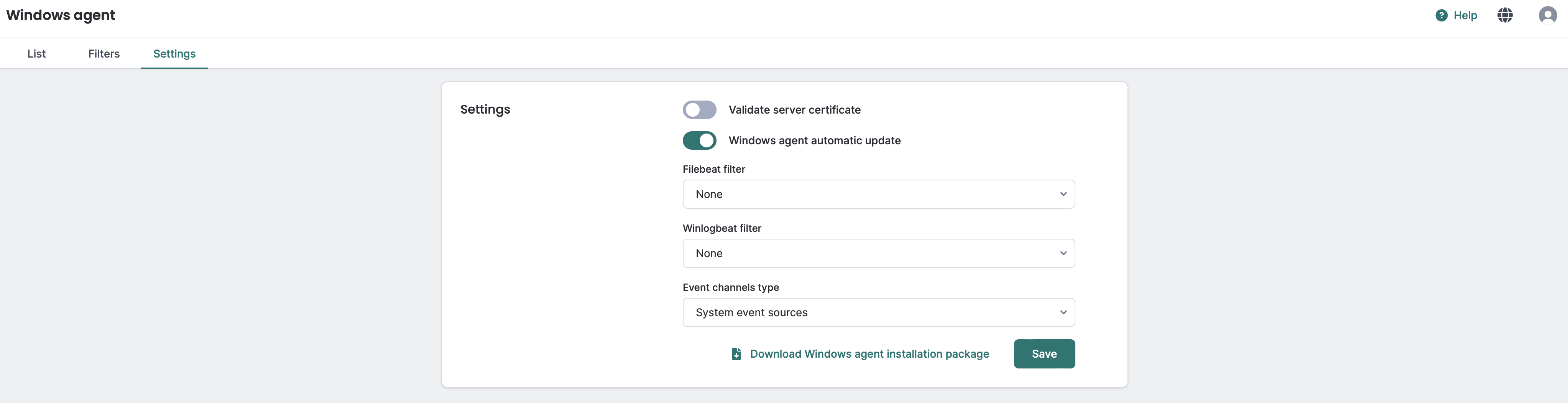
Windows Agents global settings
If your agent’s Event Sources configuration option is set to Inherit from Windows Agents settings, it will inherit the Event Sources option from this menu.
If your agent does not have a filter set explicitly, it will automatically retrieve the filter settings from this menu.
Available options:
- Validate server certificate: The agent will validate the Logmanager certificate.
Make sure that endpoints on which Windows Agents are installed trust the Logmanager certificate. Otherwise, enabling this option will cause agents to drop their connection with Logmanager. You can find this certificate configuration in Settings > Security > TLS menu.
- Windows agent automatic update: When this option is enabled, new Logmanager Windows agent versions will be automatically distributed when available.
Only packages with self-update capability will work with this option.
- Event sources:
- All event sources: Collect all Windows Events (Event Viewer > Windows Logs folder and Event Viewer > Application and Services Logs folder).
Choosing this option will make the agent send every event generated on the endpoint. Consider applying a filter to limit the number of collected events.
- System event sources: Collect only System Events (Event Viewer > Windows Logs folder only).
- All event sources: Collect all Windows Events (Event Viewer > Windows Logs folder and Event Viewer > Application and Services Logs folder).
- Filter – winlogbeat/filebeat: Select a user-defined filter from the drop-down list. Filters are described in Windows Agent Filters. This filter will be applied to all winlogbeat/filebeat agents.
You can also download the latest version of the Logmanager Windows agent installation package by clicking the Download Logmanager Windows agent installation package button.