
Logmanager Architecture
This page provides architectural details of Logmanager 4, describing how logs and events are processed and stored. Here you’ll find explanations of the complete log processing pipeline, from ingestion to storage.
The diagram below shows a simplified view of the log flow through Logmanager:
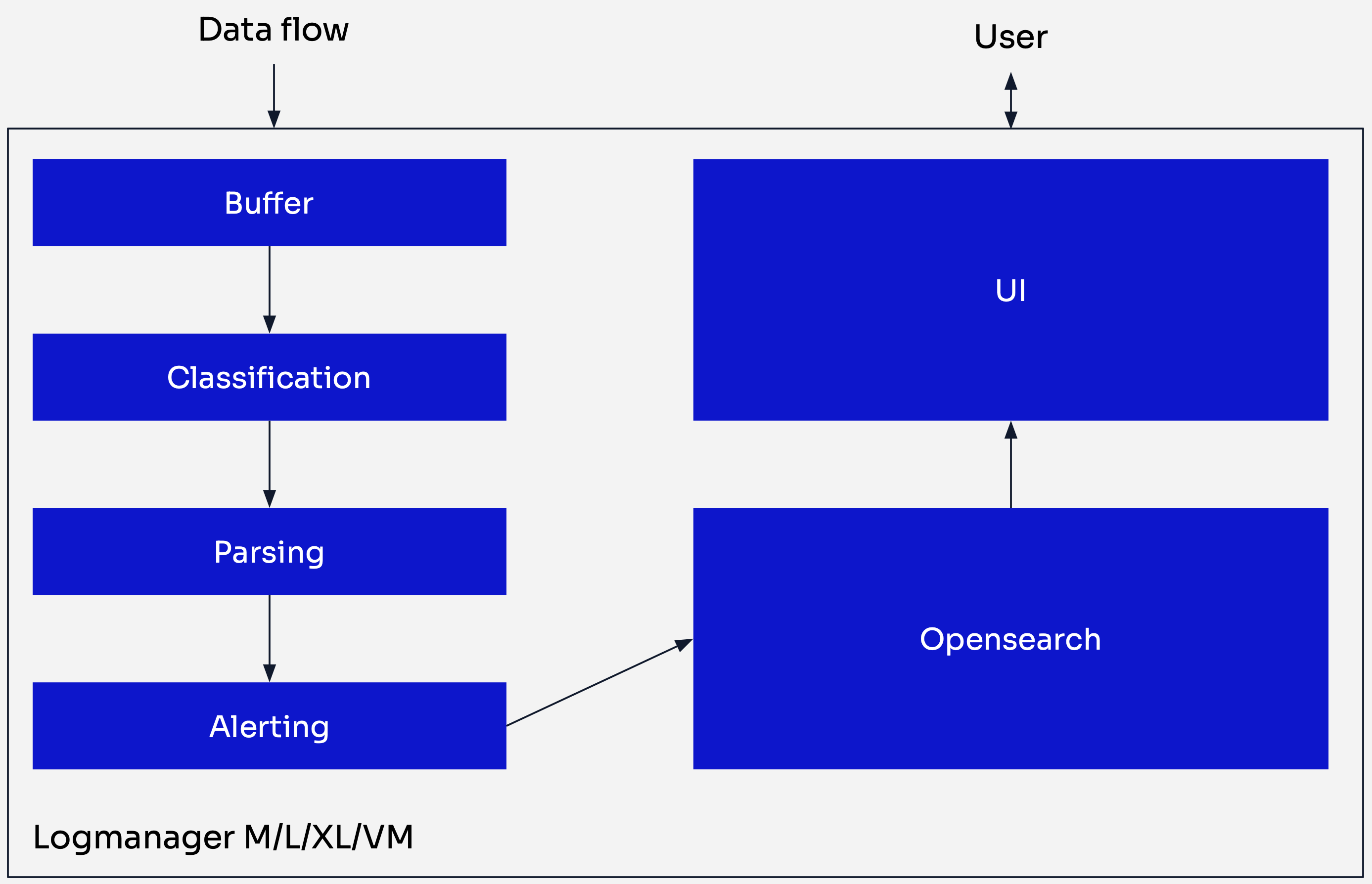
Logmanager log flow
-
Data Ingestion: Logs are received by Logmanager from various sources.
-
Buffer: Each incoming log is stored in a buffer and assigned a timestamp (
@timestamp). Main purpose of the buffer is to provide additional layer of security for your data. In case of system overload all log are safely stored here waiting for their turn to be processed. If the buffer approaches maximum capacity, an email notification is sent to the operator to indicate potential Logmanager overload. -
Classification: This process determines which parser should process a given log. During classification, metadata is automatically generated and appended to the log. Metadata helps identify the log origin. Examples include:
meta.src.ip- the IP address of the device that generated the logmeta.src.transport- the Logmanager network port on which log was receivedmeta.parser- the parser that will process the log in the next step
Logmanager provides built-in classification rules for various log sources that helps you quickly onboard your environment. Also you can fine tune by creating custom classification configurations depending on your needs. For more information, refer to Classification.
-
Parsing: Logs are processed by the parser selected in the previous step. Raw log data is extracted and mapped to individual fields according to the parser logic. Refer to Parsers for more information.
-
Alerting: Correlation rules and alerts are evaluated and triggered at this stage. Alerts can also enrich logs by creating new message data without modifying the parser. When an email notification is sent for an alert, the system automatically assigns the tag
notified, which is used to display all sent alerts in the Alerted Events dashboard. For more information, refer to Rules. -
OpenSearch Storage: Logs are stored in the OpenSearch database in JSON format, ready for analysis and visualization.
-
User Interface: The UI provides capabilities for searching, analyzing, configuring, and managing the Logmanager appliance.
-
Raw Log Preservation: Regardless of classification or parsing results, each log is stored in the database in its original raw form in the
rawfield. Additinally unparsed logs will be put inunparsedindex. -
Immutable Storage: The database is designed to prevent modification or deletion of stored logs, ensuring data integrity and compliance.
-
Timestamp Generation: The
@timestampfield is generated based on when the log arrives at the Logmanager buffer (ingress time). To ensure data credibility, Logmanager does not rely on any timestamp mentioned in the log header or payload.
Logmanager 4 introduces a fundamentally different indexing approach compared to version 3. This section explains core indexing concepts and describes the architectural improvements that deliver better performance and more efficient log management.
Understanding indexes is essential to appreciating the architectural changes in Logmanager 4.
An index is a collection of documents, similar to a database table, optimized for fast searching and analysis. Each document is a set of key-value pairs (fields).
This breaks down as follows:
- A document is a single record, like a JSON object. When a log enters the system, it becomes a document within an index.
- An index is a grouping of related documents — kind of like a database table.
- Since we’re grouping related documents, you’ll typically have multiple indexes in your system.
- Finally, how documents get grouped depends on your indexing strategy.
Indices and indexes are both plural forms of index and can be used interchangeably.
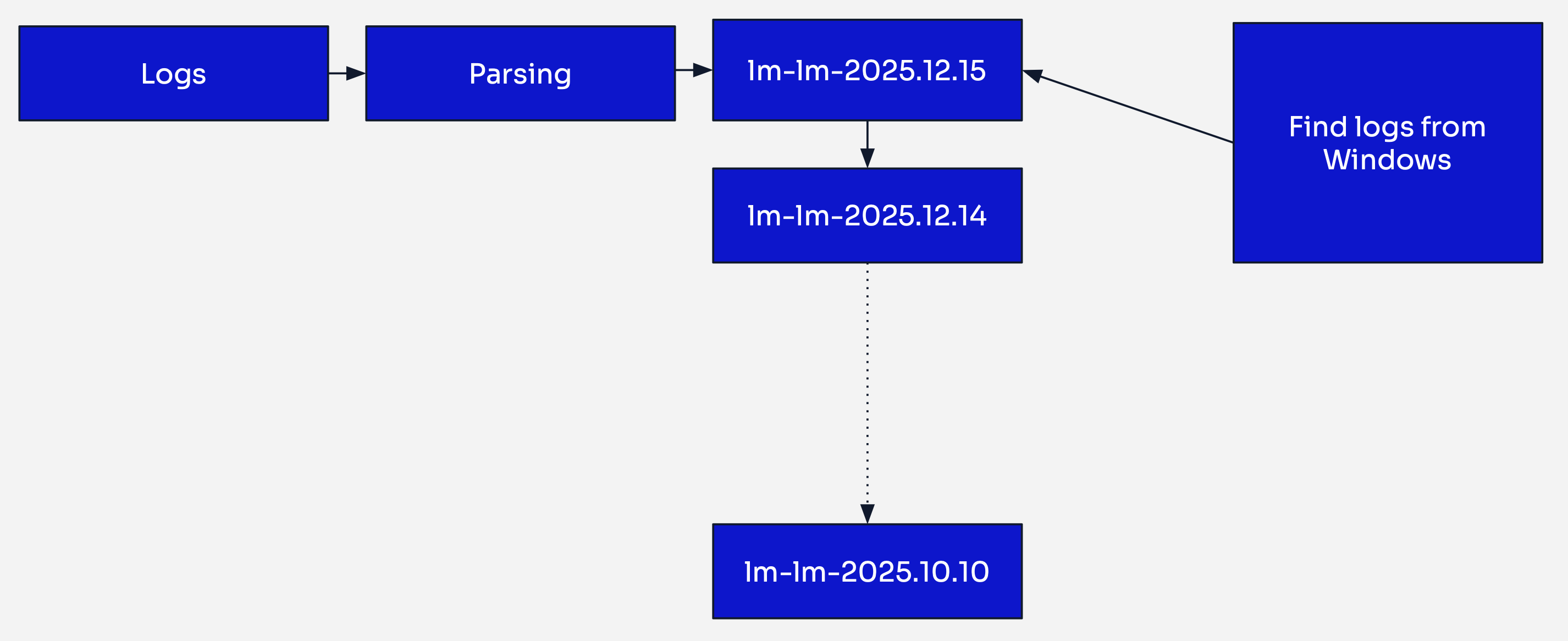
Logmanager 3 indexing strategy
In Logmanager 3, logs from all sources were processed by their respective parsers and then ingested into a single daily index. Every log generated within a 24-hour period ended up in the same index, regardless of its source or type.
For example, on January 15th, 2024, all logs — whether from Windows servers, firewalls, Linux systems, or any other source — were stored together in an index named lm-lm-2024.01.15.
This time-based approach worked adequately for smaller environments, but presented several challenges as deployments scaled:
-
Search Performance: When searching for specific logs (e.g., Windows Event logs), the search engine had to scan through an entire day’s worth of heterogeneous data from all sources. In large deployments with 300GB+ daily indexes, this resulted in slow query response times.
-
Multi-Day Searches: Searching across extended time periods compounded the performance issues, as the engine needed to scan multiple massive daily indexes.
-
Resource Inefficiency: Even narrow searches targeting specific log types consumed significant cluster resources by scanning irrelevant data.
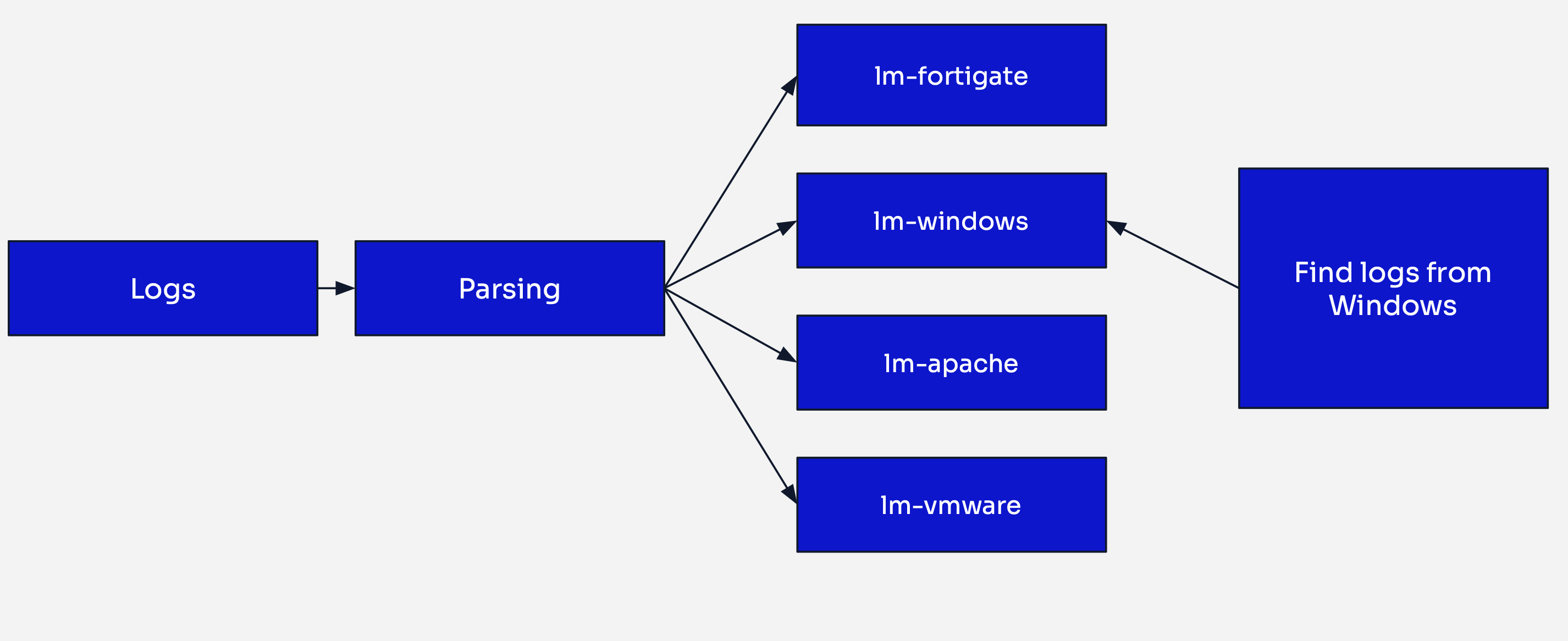
Logmanager 4 indexing strategy
Logmanager 4 addresses these limitations through parser-based indexing, a strategy that groups logs by the parser that processed them rather than by ingestion time.
Each parser now writes to its own dedicated index. For example:
- Windows logs processed by the
lm-windowsparser are stored in thelm-windowsindex - Firewall logs processed by the
lm-linux-iptablesparser are stored in thelm-linux-iptablesindex - Linux logs processed by the
lm-linuxparser are stored in thelm-linuxindex
Faster Searches: When searching for Windows logs, the search engine queries only the lm-windows index, bypassing all other log types. This targeted approach significantly reduces search times, especially in environments with diverse log sources.
Improved Resource Utilization: Queries consume fewer cluster resources by scanning only relevant indexes, leaving more capacity for concurrent searches and other operations.
Eliminated Mapping Conflicts: Each parser has its own index with dedicated field mappings, preventing field conflicts that could occur when different log types share an index.
Better Scalability: Adding new log sources creates new indexes without impacting existing ones, making the system easier to scale and maintain.
The following capabilities are planned for future releases beyond version 4.1.x
Granular Index Management: Parser-based indexing will enable tailored configurations per log type:
- Custom retention policies (e.g., firewall logs for 90 days, audit logs for 7 years)
- Optimized shard allocation and replication settings
- Index lifecycle management policies based on data criticality
To illustrate the performance difference, consider searching for failed Windows authentication events from the last 7 days:
LM3 approach: The search engine scans 7 daily indexes, each potentially containing hundreds of gigabytes of mixed log types, then filters for Windows authentication events.
LM4 approach: The search engine queries only the lm-windows index covering the last 7 days, searching through a much smaller, homogeneous dataset containing only Windows logs.
Logmanager 4 employs automated index management to maintain optimal system performance, storage efficiency, and data integrity. Behind the scenes, indices undergo multiple lifecycle stages — from creation through optimization to eventual deletion — all without requiring manual intervention.
This automated approach ensures that:
- Storage resources are used efficiently
- Search performance remains consistent
- System maintenance overhead is minimal
- Data retention policies are enforced
Indexes are created dynamically as new log sources are onboarded to Logmanager.
When a log arrives at Logmanager, the following sequence occurs:
- Classification and Parsing: The log is classified and assigned a parser via the
meta.parserfield - Parser Identification: The system inspects the
meta.parsermetadata field - Index Check: Logmanager verifies whether an index for this parser already exists
- Index Creation: If no index exists, a new one is created automatically with the appropriate name based on the
meta.parserfield - Document Ingestion: The parsed log document is written to the index
This just-in-time creation approach means you never need to pre-configure indexes before adding new log sources. The system adapts automatically to your environment.
Logmanager 4 follows a consistent naming pattern that makes indexes easy to identify and manage:
- Built-in parsers:
<parser-name>-000001(e.g.,lm-windows-000001,lm-firewall-000001,lm-linux-000001) - Custom user parsers:
lm-user-<parser-name>-000001(e.g.,lm-user-my-app-000001,lm-user-custom-device-000001) - Unparsed logs: Stored in the dedicated
unparsed-000001index for logs that couldn’t be classified or parsed successfully
The numerical suffix (-000001, -000002, etc.) indicates the rollover sequence number, which increments each time an index is rolled over.
Numerical suffixes are not visible from user perspective. In the UI you will only see the name of the index without suffix. For example:lm-user-my-apporlm-windows.
When creating a new index, Logmanager automatically applies:
- Field mappings specific to the parser type, ensuring data is stored with correct data types
- Index settings optimized for the expected log volume and query patterns
- Lifecycle policies that govern rollover and retention behavior
Rollovers are a critical mechanism for maintaining system performance and managing storage efficiently. Rather than allowing indexes to grow indefinitely, Logmanager splits them into manageable segments at predefined thresholds.
An index rollover is automatically triggered when either of these conditions is met:
- Size threshold: The index reaches 40GB in size
- Age threshold: The index is 30 days old
These thresholds are designed to balance search performance, storage efficiency, and operational overhead.
When a rollover is triggered, the following sequence occurs:
- Rollover Initiation: The system detects that an index has met a rollover condition (e.g.,
lm-windows-000001reaches 40GB) - New Index Creation: A new index with an incremented suffix is created (e.g.,
lm-windows-000002) - Write Index Update: The new index becomes the write index — all new documents for this parser are now written to
lm-windows-000002 - Previous Index Transition: The previous index (
lm-windows-000001) becomes read-only and is no longer accepting new data - Search Continuity: Both indexes remain searchable — queries automatically span all relevant indexes to provide complete results
Rollovers provide several important benefits:
- Consistent Performance: Smaller indexes deliver faster search response times compared to monolithic indexes
- Efficient Deletion: Retention policies can delete entire rolled-over indexes atomically, which is much faster than deleting individual documents
- Parallel Processing: Smaller index segments can be processed in parallel during searches, improving query throughput
Consider a high-volume Windows environment generating 5GB of logs daily:
- Day 1-8: Logs accumulate in
lm-windows-000001(40GB reached on day 8) - Day 8: Rollover triggered;
lm-windows-000002created and becomes the write index - Day 8:
lm-windows-000001moved to warm storage (if available) - Day 9-16: Logs accumulate in
lm-windows-000002 - Day 16: Another rollover;
lm-windows-000003created - Searches: Queries for “last 30 days” automatically span
lm-windows-000001,lm-windows-000002, andlm-windows-000003
Logmanager implements automatic retention policies to prevent disk exhaustion and maintain system stability. When storage capacity approaches limits, the system intelligently removes the oldest data first.
Logmanager uses watermark-based retention tied to OpenSearch disk utilization thresholds:
- Low Disk Watermark (~85% disk usage): OpenSearch stops allocating new shards to the node
- High Disk Watermark (~90% disk usage): OpenSearch attempts to relocate shards away from the node
- Flood Stage Watermark (~95% disk usage): Indexes become read-only to prevent complete disk exhaustion
When the low disk watermark is reached, Logmanager’s retention policy activates:
- Oldest Index Identification: The system identifies the oldest rolled-over indexes across all parsers
- Deletion: Entire indexes are deleted (not individual documents), starting with the oldest
- Space Recovery: Deletion continues until disk usage falls below the watermark threshold
- Monitoring: Information about retention policies actively deleting data are stored in internal index to provide reference point in case of any issues
Unparsed Index Protection: The unparsed index follows the same retention policy. Since unparsed logs represent the raw, unprocessed originals of unparsed logs, this index can grow significantly and may be subject to earlier deletion.
No Granular Retention: In Logmanager 4.1.x, retention policies apply globally based on disk space, not per-parser or per-index. Custom retention policies per log type are planned for future releases.
Monitoring Recommendations: Regularly monitor disk utilization and index growth patterns to anticipate when retention policies may begin deleting data earlier than desired. Consider expanding storage capacity or optimizing log sources if disk pressure is frequent.