
Message structure
This section is available only in EnglishThis block is used to obtain data processed by the program. There is a possibility to obtain data from message dictionary – key data, meta, raw raw_real. There is special value event for accessing whole structure.
Difference between raw and raw_real is on raw is already stripped to only valid syslog data - offset is applied, but in raw_real value is not stripped.
The meta dictionary contains a src sub-dictionary with extracted source information (IP address, host, program, etc.). These fields can be modified during processing to correct faulty source data. See Modify meta.src for details and examples.
XML representation of message block
<xml xmlns="http://www.w3.org/1999/xhtml">
  <block type="message">
    <field name="OBJECT">msg</field>
  </block>
  <block type="message">
    <field name="OBJECT">meta</field>
  </block>
  <block type="message">
    <field name="OBJECT">raw</field>
  </block>
  <block type="message">
    <field name="OBJECT">event</field>
  </block>
</xml>

Block “Message”
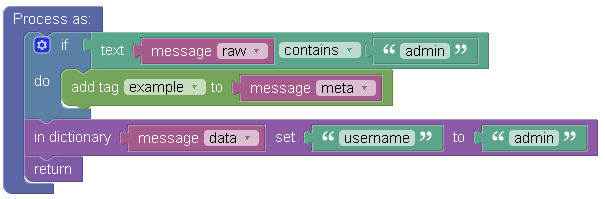
Example of “message” block
Message block is used twice in the example:
- If text message row: Reads data from “raw” key and then compares, if it contains word admin. If yes, it returns boolean value “true”.
- Update dictionary row: updates dictionary “message” key “data” by dictionary “item”.
Login permitted from 192.168.10.1/1234 to inside:192.168.1.1/https for user admin

Results of the “message” block